Bank statement template
Extract bank statement transactions to JSON
Upload a bank or card statement and get every transaction row with its date, description, reference, debit, credit and running balance, plus the account details and opening and closing balances.
No account needed for the Playground. The bank-statement template is already picked for you.
At a glance
- 19 fields, including transactions
- PDF, PNG and JPEG, including scans and photos
- Output: JSON, Excel (.xlsx), CSV
- Built to return null instead of guessing
- Documents are not stored after a request finishes
- Good for: reconciliation and bookkeeping, loan and rental applications, spending analysis
Fields
What gets extracted
The bank-statement template, exactly as it is saved in a new workspace. Every key comes back in the response. A value that is not on the document is null.
| Field | Type | Description |
|---|---|---|
| bank_name | string | |
| account_holder | string | |
| account_numberrequiredAs printed, including any masking. | string | As printed, including any masking. |
| account_typeFor example checking, savings, or credit card. | string | For example checking, savings, or credit card. |
| iban | string | |
| currencyISO 4217 code, for example USD, EUR, or LKR. | string | ISO 4217 code, for example USD, EUR, or LKR. |
| statement_start_daterequired | date | |
| statement_end_daterequired | date | |
| opening_balancerequired | number | |
| closing_balancerequired | number | |
| total_creditsSum of money in for the period, as printed. | number | Sum of money in for the period, as printed. |
| total_debitsSum of money out for the period, as printed. | number | Sum of money out for the period, as printed. |
| transactionsrequiredEvery transaction row, in statement order. Skip balance brought forward and carried forward lines. | object[] | Every transaction row, in statement order. Skip balance brought forward and carried forward lines. |
| └ daterequired | date | |
| └ descriptionrequired | string | |
| └ referenceCheque number or transaction reference. | string | Cheque number or transaction reference. |
| └ debitrequiredMoney out, as a positive number. Null if none. | number | Money out, as a positive number. Null if none. |
| └ creditrequiredMoney in, as a positive number. Null if none. | number | Money in, as a positive number. Null if none. |
| └ balanceRunning balance after this row, if printed. | number | Running balance after this row, if printed. |
Key fields
Bank statement fields worth knowing
What the trickier fields in the bank-statement template hold, and how they relate.
transactions[].debit and transactions[].credit
The template asks for money out and money in as two separate positive numbers, with null on the side a row does not use. If your bank prints one signed amount column, you can swap them for a single amount field in the schema editor.
transactions[].balance
The running balance after each row, when the statement prints one. It is not calculated, so rows without a printed balance come back as null.
opening_balance and closing_balance
Copied from the statement summary as printed. A quick check: opening_balance plus total_credits minus total_debits should equal closing_balance.
Example
From bank statement to JSON
An illustrative bank statement with a made-up company and numbers, and the JSON the bank-statement template returns for it. Fields that are not on the document come back as null.
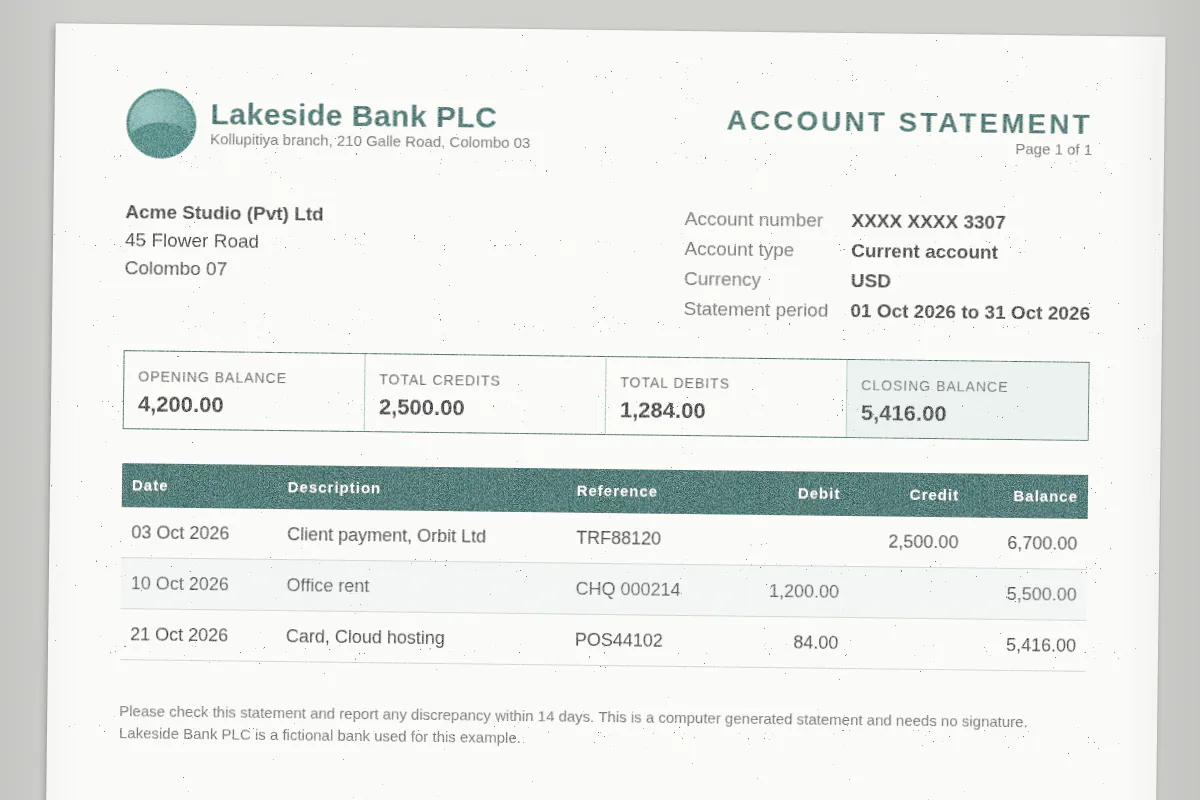
{
  "bank_name": "Lakeside Bank PLC",
  "account_holder": "Acme Studio (Pvt) Ltd",
  "account_number": "XXXX XXXX 3307",
  "account_type": "current",
  "iban": null,
  "currency": "USD",
  "statement_start_date": "2026-10-01",
  "statement_end_date": "2026-10-31",
  "opening_balance": 4200,
  "closing_balance": 5416,
  "total_credits": 2500,
  "total_debits": 1284,
  "transactions": [
    {
      "date": "2026-10-03",
      "description": "Client payment, Orbit Ltd",
      "reference": "TRF88120",
      "debit": null,
      "credit": 2500,
      "balance": 6700
    },
    {
      "date": "2026-10-10",
      "description": "Office rent",
      "reference": "CHQ 000214",
      "debit": 1200,
      "credit": null,
      "balance": 5500
    },
    {
      "date": "2026-10-21",
      "description": "Card, Cloud hosting",
      "reference": "POS44102",
      "debit": 84,
      "credit": null,
      "balance": 5416
    }
  ]
}
Common gotchas
Where bank statement extraction trips up
Things that often catch people out with bank statement data, and how to handle them.
Masked account numbers
account_number is copied as printed, including masking like XXXX 3307. Masked digits stay masked.
Transactions over many pages
Rows that continue across pages come back as one transactions array in order, with repeated header rows skipped. A statement with no transactions returns an empty array.
Credit card statements
account_type covers checking, savings and credit card accounts. On a card statement, purchases are normally debits and payments to the card are credits.
How it works
Three steps, no setup.
- Step 1
Upload the document
Drop a bank statement into the Playground, or send it base64 encoded to the API. PDF, PNG and JPEG all work.
- Step 2
Pick the template
Choose the bank-statement schema. It is already in every new workspace and guest browser, and you can edit its fields.
- Step 3
Get typed JSON
The model fills exactly the schema's keys, with numbers as numbers and dates as yyyy-mm-dd. Copy it or use it from your code.
API
Parse a bank statement with one request
Send the file to POST /api/v1/parse with "schema": "bank-statement". The saved template is used by name, so there is nothing else to send.
Create an API key in your workspace after you sign up. If you deleted or renamed the template, pass the schema definition inline instead of its name. The same call is available to AI agents through the MCP server.
Read the API docscurl -X POST https://doc2json.manoonlabs.com/api/v1/parse \
-H "Authorization: Bearer $DOC2JSON_KEY" \
-H "Content-Type: application/json" \
-d "{\"file_base64\": \"$(base64 -w0 bank-statement.pdf)\", \"schema\": \"bank-statement\"}"Schema
The bank-statement schema
The JSON Schema behind the bank-statement template. Paste it into the schema editor as a starting point, or send it inline as "schema" in an API request if you deleted or renamed the template.
{
  "type": "object",
  "description": "A bank or card account statement for one period.",
  "properties": {
    "bank_name": {
      "type": "string"
    },
    "account_holder": {
      "type": "string"
    },
    "account_number": {
      "type": "string",
      "description": "As printed, including any masking."
    },
    "account_type": {
      "type": "string",
      "description": "For example checking, savings, or credit card."
    },
    "iban": {
      "type": "string"
    },
    "currency": {
      "type": "string",
      "description": "ISO 4217 code, for example USD, EUR, or LKR."
    },
    "statement_start_date": {
      "type": "date"
    },
    "statement_end_date": {
      "type": "date"
    },
    "opening_balance": {
      "type": "number"
    },
    "closing_balance": {
      "type": "number"
    },
    "total_credits": {
      "type": "number",
      "description": "Sum of money in for the period, as printed."
    },
    "total_debits": {
      "type": "number",
      "description": "Sum of money out for the period, as printed."
    },
    "transactions": {
      "type": "array",
      "description": "Every transaction row, in statement order. Skip balance brought forward and carried forward lines.",
      "items": {
        "type": "object",
        "properties": {
          "date": {
            "type": "date"
          },
          "description": {
            "type": "string"
          },
          "reference": {
            "type": "string",
            "description": "Cheque number or transaction reference."
          },
          "debit": {
            "type": "number",
            "description": "Money out, as a positive number. Null if none."
          },
          "credit": {
            "type": "number",
            "description": "Money in, as a positive number. Null if none."
          },
          "balance": {
            "type": "number",
            "description": "Running balance after this row, if printed."
          }
        },
        "required": [
          "date",
          "description",
          "debit",
          "credit"
        ]
      }
    }
  },
  "required": [
    "account_number",
    "statement_start_date",
    "statement_end_date",
    "opening_balance",
    "closing_balance",
    "transactions"
  ]
}
FAQ
Bank statement to JSON, answered.
Can I get the transactions as CSV or Excel?
Yes. After a parse, use Download and pick CSV for one row per transaction with the account details repeated on each row, or Excel (.xlsx) for the statement summary on one sheet and the transactions on another. Over the API, add export=csv or export=xlsx to the parse request.
How long a statement can I send?
Free allows up to 10 pages per document, and paid plans allow more. Each page costs one credit, so a 4-page statement uses 4 credits.
Do you store my bank statement documents?
No. The file is processed in memory for the request and then dropped. Neither the document nor the extracted JSON is saved. Only a usage record is kept, with things like the time, page count and credits used.
Can I change the fields?
Yes. Every new workspace, and every guest browser, starts with the bank-statement template as a normal schema. Edit it, rename keys, add fields or delete it. Changes are yours, and a deleted template does not come back.
What happens when a value is not on the document?
It comes back as null. doc2json is built to return null instead of guessing, so you can tell missing data from real data.
Is it free to try?
Yes. The Playground works without an account, using a small guest allowance. A free account adds monthly credits, saved schemas and an API key. One credit is one page.
Need a spreadsheet instead? Bank statement to Excel or Bank statement to CSV
Other templates
Try it on your own bank statement.
Open the Playground with the bank-statement template picked, drop in a file, and see the JSON. Sign up free when you want an API key.