bank statement to Excel
Convert bank statement PDF to Excel
Your bank will happily give you a PDF. Your accountant wants a spreadsheet. doc2json reads the statement, PDF, scan or phone photo, and hands you an Excel file with every transaction on its own row: date, description, reference, debit, credit and running balance. Dates are real dates and amounts are real numbers, so SUM and filters work the moment you open it.
Made-up example
What the Excel file looks like
Example only. Lakeside Bank PLC and Acme Studio are invented. This is the file doc2json produces for the made-up statement shown on the bank statement to JSON page.
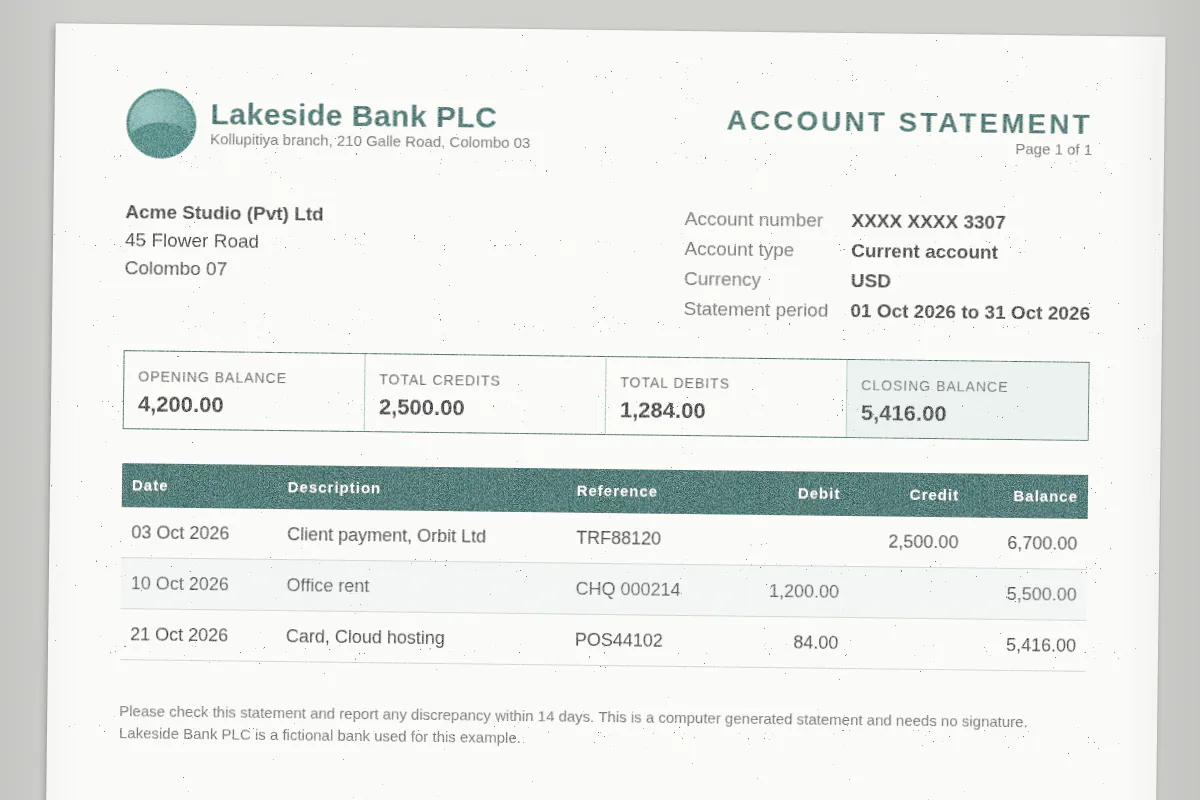
| Row | document | bank_name | account_holder | account_number | account_type | iban | currency | statement_start_date | statement_end_date | opening_balance | closing_balance | total_credits | total_debits |
|---|---|---|---|---|---|---|---|---|---|---|---|---|---|
| 2 | lakeside-oct-2026.pdf | Lakeside Bank PLC | Acme Studio (Pvt) Ltd | XXXX XXXX 3307 | current | USD | 2026-10-01 | 2026-10-31 | 4200 | 5416 | 2500 | 1284 |
Empty cells mean the statement didn't print that value. We leave them blank instead of guessing.
How it works
Three steps, no setup.
- Step 1
Upload the statement
Drop a PDF, PNG or JPEG into the Playground with the bank statement template picked. No account needed to try it.
- Step 2
We pull out the rows
doc2json reads every page and returns the account details, opening and closing balances, and each transaction in order, with repeated table headers skipped.
- Step 3
Download Excel
Hit Download and pick Excel (.xlsx). You get a Document sheet with the account summary and a transactions sheet with one row per transaction.
API
One request, one spreadsheet
Add export=xlsx to a normal parse. You still get the JSON, plus the file as base64. Same credits as a plain parse.
curl -X POST https://doc2json.manoonlabs.com/api/v1/parse \
  -H "Authorization: Bearer $DOC2JSON_KEY" \
  -F file=@lakeside-oct-2026.pdf \
  -F schema=bank-statement \
  -F export=xlsx \
  | jq -r '.export.content' | base64 -d > lakeside-oct-2026-2026-10-30.xlsx
Why doc2json
Why doc2json and not a generic PDF to Excel converter
Rows, not a screenshot of the page
Generic converters copy the layout: logos, page footers, "continued overleaf", the lot. You get one tidy transactions table and nothing else.
No merged-cell archaeology
Multi-line descriptions stay in one cell, debit and credit stay in their own columns, and a statement that spans several pages is still one table.
Columns you choose
Bank prints one signed amount column? Swap debit and credit for a single amount field in the schema editor and the Excel file follows.
FAQ
Bank statement to Excel, answered.
Does it work with scanned or photographed bank statements?
Yes. PDFs, PNGs and JPEGs are all read directly, so a scan or a phone photo works as long as the text is legible. Flat and well lit beats artistic angles.
Will the dates and amounts work as numbers in Excel?
Yes. Dates are written as real date cells and amounts as real number cells, so sorting, filters, SUM and pivot tables work straight away. No "number stored as text" warnings.
My bank prints one amount column with minus signs. Can I get that?
Yes. The template uses separate debit and credit columns, but you can edit it in the schema editor and replace them with a single amount field. The Excel export follows whatever schema you parse with.
Do you store my bank statements?
No. The statement is processed in memory for the request and then dropped. Neither the file nor the extracted data is saved, only a usage record with the time, page count and credits used.
How much does a bank statement to Excel conversion cost?
The free plan gives you 50 pages a month, and one page is one credit. Excel and CSV downloads cost nothing extra. You can try it in the Playground without an account.
Related
- Want the raw JSON instead? Bank statement to JSON
- Need a CSV for an import? Bank statement to CSV
- All templates
Got a statement sitting in your downloads?
Try it on a real one. 50 free pages a month, no card needed.