Invoice template
Convert invoice PDF to JSON
Upload an invoice as a PDF, a scan or a phone photo and get back JSON with the vendor, dates, totals, tax and each line item. The invoice template is ready to use, and you can edit its fields to match your own system.
No account needed for the Playground. The invoice template is already picked for you.
At a glance
- 26 fields, including line_items
- PDF, PNG and JPEG, including scans and photos
- Output: JSON, Excel (.xlsx), CSV
- Built to return null instead of guessing
- Documents are not stored after a request finishes
- Good for: accounts payable intake, bookkeeping and expense tools, matching invoices to purchase orders
Fields
What gets extracted
The invoice template, exactly as it is saved in a new workspace. Every key comes back in the response. A value that is not on the document is null.
| Field | Type | Description |
|---|---|---|
| vendor_namerequiredCompany that issued the invoice. | string | Company that issued the invoice. |
| vendor_address | string | |
| vendor_tax_idVAT, GST, or other tax registration number of the vendor. | string | VAT, GST, or other tax registration number of the vendor. |
| customer_nameBill-to company or person. | string | Bill-to company or person. |
| customer_address | string | |
| invoice_numberrequired | string | |
| invoice_daterequired | date | |
| due_date | date | |
| purchase_order_numberPO number referenced on the invoice, if any. | string | PO number referenced on the invoice, if any. |
| currencyrequiredISO 4217 code, for example USD, EUR, or LKR. | string | ISO 4217 code, for example USD, EUR, or LKR. |
| subtotalTotal before tax. | number | Total before tax. |
| discount | number | |
| shipping | number | |
| tax_rateTax rate as a percentage, for example 8 for 8%. | number | Tax rate as a percentage, for example 8 for 8%. |
| tax_amount | number | |
| totalrequiredGrand total including tax. | number | Grand total including tax. |
| amount_dueBalance still to pay after any deposits or payments. | number | Balance still to pay after any deposits or payments. |
| payment_termsFor example Net 30. | string | For example Net 30. |
| line_itemsrequiredOne entry per billed line, in document order. | object[] | One entry per billed line, in document order. |
| └ descriptionrequired | string | |
| └ skuItem code or SKU. | string | Item code or SKU. |
| └ quantityrequired | number | |
| └ unitUnit of measure, for example pcs or hours. | string | Unit of measure, for example pcs or hours. |
| └ unit_pricerequired | number | |
| └ tax_ratePercentage. | number | Percentage. |
| └ amountrequiredLine total. | number | Line total. |
Key fields
Invoice fields worth knowing
What the trickier fields in the invoice template hold, and how they relate.
total and amount_due
total is the grand total including tax. amount_due is what is still owed after deposits or part payments, so the two differ on a partly paid invoice. Both are copied as printed.
tax_rate and tax_amount
tax_rate is the printed percentage, so 8% comes back as 8, not 0.08. tax_amount is the printed tax figure. A rate that differs per line goes in line_items[].tax_rate.
purchase_order_number
The buyer's PO number when the invoice quotes one. The purchase order template returns the same number as po_number, so the two documents can be matched.
Example
From invoice to JSON
An illustrative invoice with a made-up company and numbers, and the JSON the invoice template returns for it. Fields that are not on the document come back as null.
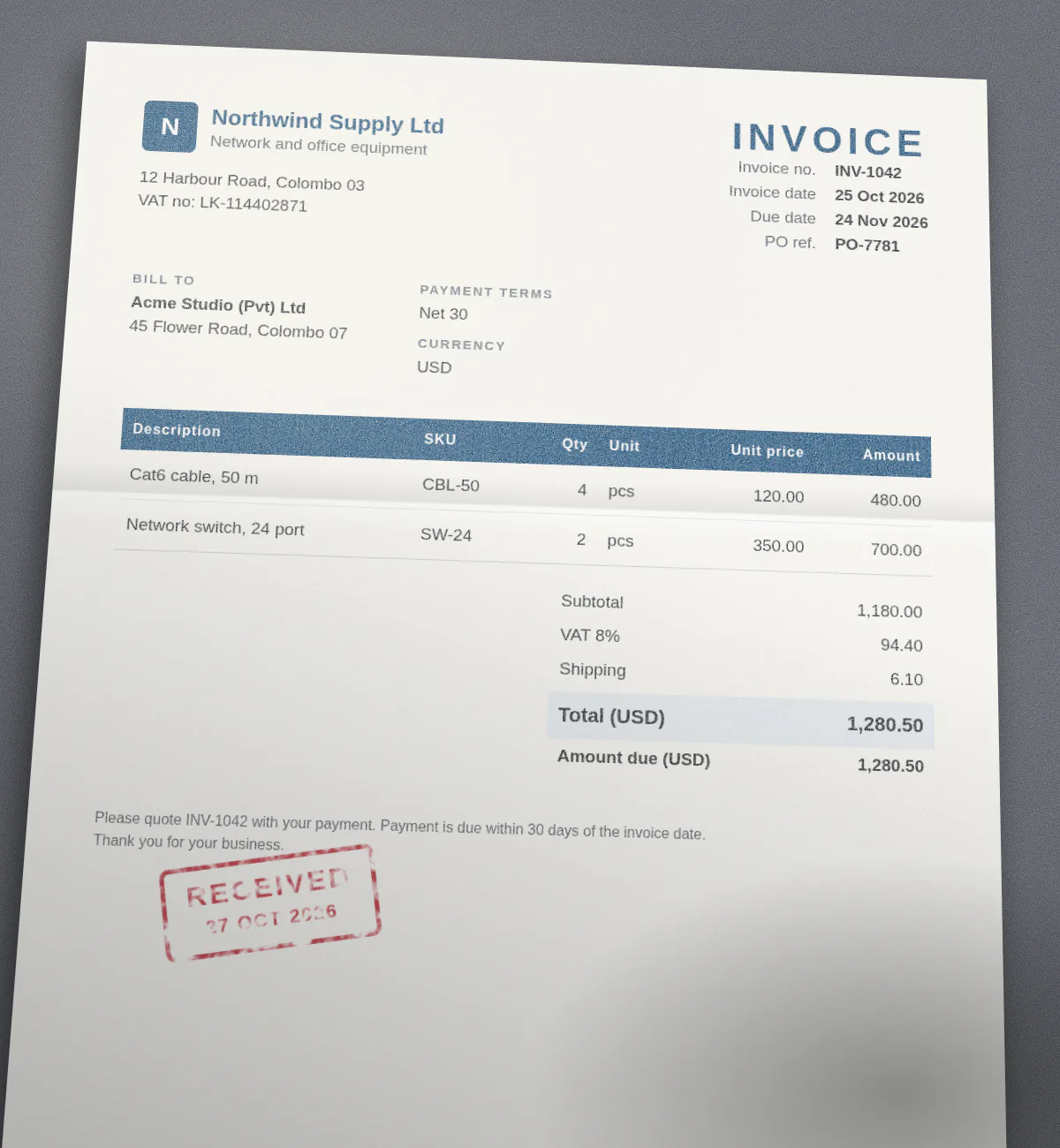
{
  "vendor_name": "Northwind Supply Ltd",
  "vendor_address": "12 Harbour Road, Colombo 03",
  "vendor_tax_id": "LK-114402871",
  "customer_name": "Acme Studio (Pvt) Ltd",
  "customer_address": "45 Flower Road, Colombo 07",
  "invoice_number": "INV-1042",
  "invoice_date": "2026-10-25",
  "due_date": "2026-11-24",
  "purchase_order_number": "PO-7781",
  "currency": "USD",
  "subtotal": 1180,
  "discount": null,
  "shipping": 6.1,
  "tax_rate": 8,
  "tax_amount": 94.4,
  "total": 1280.5,
  "amount_due": 1280.5,
  "payment_terms": "Net 30",
  "line_items": [
    {
      "description": "Cat6 cable, 50 m",
      "sku": "CBL-50",
      "quantity": 4,
      "unit": "pcs",
      "unit_price": 120,
      "tax_rate": null,
      "amount": 480
    },
    {
      "description": "Network switch, 24 port",
      "sku": "SW-24",
      "quantity": 2,
      "unit": "pcs",
      "unit_price": 350,
      "tax_rate": null,
      "amount": 700
    }
  ]
}
Common gotchas
Where invoice extraction trips up
Things that often catch people out with invoice data, and how to handle them.
Totals are copied, not calculated
A subtotal or tax figure that is not printed comes back as null rather than being worked out from the lines. If you need the sum, add up line_items in your own code and compare it with the printed total.
Line items over several pages
Rows that continue onto later pages come back as one line_items array in document order, with repeated table headers skipped. Each page uses one credit.
Number and date formats
Amounts like 1.234,56 are read with the invoice's own decimal convention and returned as 1234.56. A date such as 03/04/2026 is read using clues like the vendor's country or currency and returned as yyyy-mm-dd.
How it works
Three steps, no setup.
- Step 1
Upload the document
Drop an invoice into the Playground, or send it base64 encoded to the API. PDF, PNG and JPEG all work.
- Step 2
Pick the template
Choose the invoice schema. It is already in every new workspace and guest browser, and you can edit its fields.
- Step 3
Get typed JSON
The model fills exactly the schema's keys, with numbers as numbers and dates as yyyy-mm-dd. Copy it or use it from your code.
API
Parse an invoice with one request
Send the file to POST /api/v1/parse with "schema": "invoice". The saved template is used by name, so there is nothing else to send.
Create an API key in your workspace after you sign up. If you deleted or renamed the template, pass the schema definition inline instead of its name. The same call is available to AI agents through the MCP server.
Read the API docscurl -X POST https://doc2json.manoonlabs.com/api/v1/parse \
-H "Authorization: Bearer $DOC2JSON_KEY" \
-H "Content-Type: application/json" \
-d "{\"file_base64\": \"$(base64 -w0 invoice.pdf)\", \"schema\": \"invoice\"}"Schema
The invoice schema
The JSON Schema behind the invoice template. Paste it into the schema editor as a starting point, or send it inline as "schema" in an API request if you deleted or renamed the template.
{
  "type": "object",
  "description": "A supplier invoice or bill.",
  "properties": {
    "vendor_name": {
      "type": "string",
      "description": "Company that issued the invoice."
    },
    "vendor_address": {
      "type": "string"
    },
    "vendor_tax_id": {
      "type": "string",
      "description": "VAT, GST, or other tax registration number of the vendor."
    },
    "customer_name": {
      "type": "string",
      "description": "Bill-to company or person."
    },
    "customer_address": {
      "type": "string"
    },
    "invoice_number": {
      "type": "string"
    },
    "invoice_date": {
      "type": "date"
    },
    "due_date": {
      "type": "date"
    },
    "purchase_order_number": {
      "type": "string",
      "description": "PO number referenced on the invoice, if any."
    },
    "currency": {
      "type": "string",
      "description": "ISO 4217 code, for example USD, EUR, or LKR."
    },
    "subtotal": {
      "type": "number",
      "description": "Total before tax."
    },
    "discount": {
      "type": "number"
    },
    "shipping": {
      "type": "number"
    },
    "tax_rate": {
      "type": "number",
      "description": "Tax rate as a percentage, for example 8 for 8%."
    },
    "tax_amount": {
      "type": "number"
    },
    "total": {
      "type": "number",
      "description": "Grand total including tax."
    },
    "amount_due": {
      "type": "number",
      "description": "Balance still to pay after any deposits or payments."
    },
    "payment_terms": {
      "type": "string",
      "description": "For example Net 30."
    },
    "line_items": {
      "type": "array",
      "description": "One entry per billed line, in document order.",
      "items": {
        "type": "object",
        "properties": {
          "description": {
            "type": "string"
          },
          "sku": {
            "type": "string",
            "description": "Item code or SKU."
          },
          "quantity": {
            "type": "number"
          },
          "unit": {
            "type": "string",
            "description": "Unit of measure, for example pcs or hours."
          },
          "unit_price": {
            "type": "number"
          },
          "tax_rate": {
            "type": "number",
            "description": "Percentage."
          },
          "amount": {
            "type": "number",
            "description": "Line total."
          }
        },
        "required": [
          "description",
          "quantity",
          "unit_price",
          "amount"
        ]
      }
    }
  },
  "required": [
    "vendor_name",
    "invoice_number",
    "invoice_date",
    "currency",
    "total",
    "line_items"
  ]
}
FAQ
Invoice to JSON, answered.
Does it work with scanned or photographed invoices?
Yes. PDFs, PNGs and JPEGs are all read by the model directly, so a scan or a phone photo works as well as a digital PDF as long as the text is legible.
Can I export invoices to Excel or CSV?
Yes. After a parse, use Download next to Copy JSON. Excel puts the invoice header on one sheet and the line items on another. CSV gives one row per line item with the invoice fields repeated. Over the API, add export=xlsx or export=csv to the parse request.
Do you store my invoice documents?
No. The file is processed in memory for the request and then dropped. Neither the document nor the extracted JSON is saved. Only a usage record is kept, with things like the time, page count and credits used.
Can I change the fields?
Yes. Every new workspace, and every guest browser, starts with the invoice template as a normal schema. Edit it, rename keys, add fields or delete it. Changes are yours, and a deleted template does not come back.
What happens when a value is not on the document?
It comes back as null. doc2json is built to return null instead of guessing, so you can tell missing data from real data.
Is it free to try?
Yes. The Playground works without an account, using a small guest allowance. A free account adds monthly credits, saved schemas and an API key. One credit is one page.
Need a spreadsheet instead? Invoice to Excel or Invoice to CSV
Other templates
Try it on your own invoice.
Open the Playground with the invoice template picked, drop in a file, and see the JSON. Sign up free when you want an API key.