bank statement to CSV
Convert bank statement PDF to CSV
Most accounting and budgeting tools will import a CSV. Almost no bank will give you one for older statements. doc2json closes that gap: upload the PDF or a scan, get a CSV with one row per transaction and the account details repeated on every row, so nothing gets lost when you paste it into something else.
Made-up example
What the CSV file looks like
Example only. Invented bank, company and numbers.
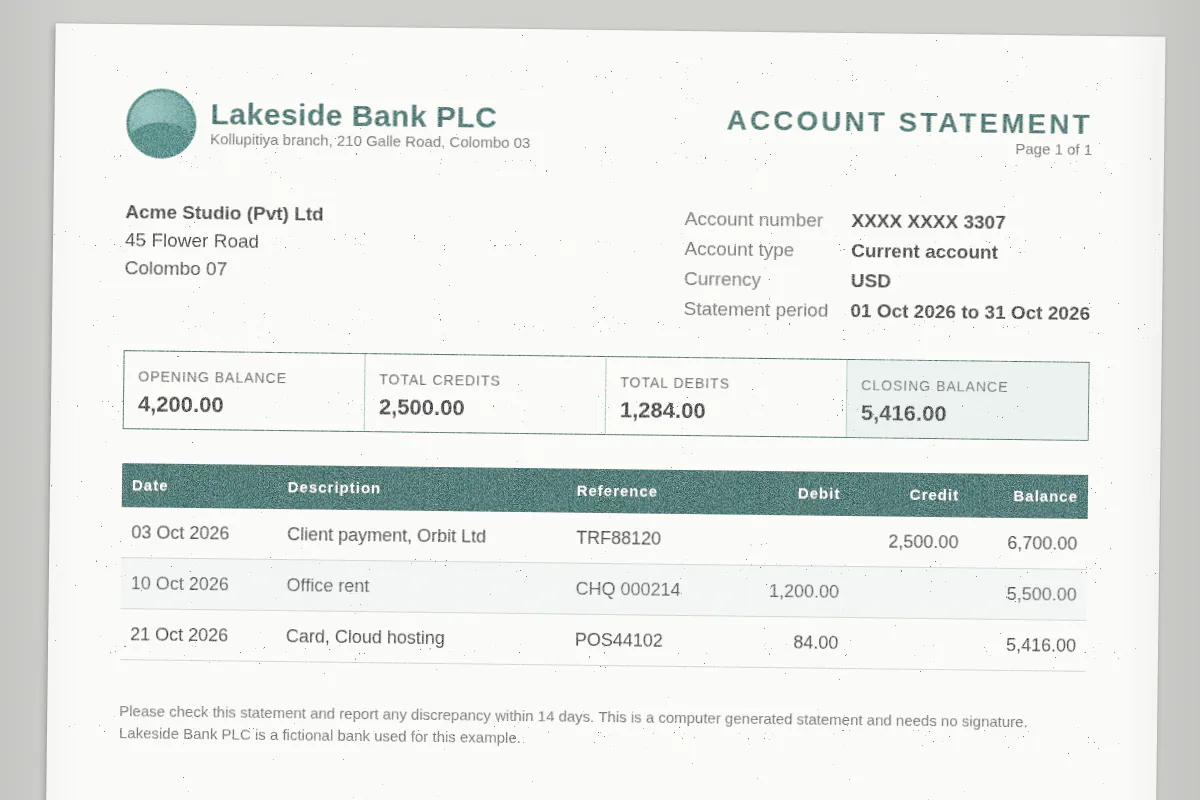
| Row | bank_name | account_holder | account_number | account_type | iban | currency | statement_start_date | statement_end_date | opening_balance | closing_balance | total_credits | total_debits | transactions.date | transactions.description | transactions.reference | transactions.debit | transactions.credit | transactions.balance |
|---|---|---|---|---|---|---|---|---|---|---|---|---|---|---|---|---|---|---|
| 2 | Lakeside Bank PLC | Acme Studio (Pvt) Ltd | XXXX XXXX 3307 | current | USD | 2026-10-01 | 2026-10-31 | 4200 | 5416 | 2500 | 1284 | 2026-10-03 | Client payment, Orbit Ltd | TRF88120 | 2500 | 6700 | ||
| 3 | Lakeside Bank PLC | Acme Studio (Pvt) Ltd | XXXX XXXX 3307 | current | USD | 2026-10-01 | 2026-10-31 | 4200 | 5416 | 2500 | 1284 | 2026-10-10 | Office rent | CHQ 000214 | 1200 | 5500 | ||
| 4 | Lakeside Bank PLC | Acme Studio (Pvt) Ltd | XXXX XXXX 3307 | current | USD | 2026-10-01 | 2026-10-31 | 4200 | 5416 | 2500 | 1284 | 2026-10-21 | Card, Cloud hosting | POS44102 | 84 | 5416 |
Commas inside a description get quoted, as the CSV spec intended. Your importer will thank you.
How it works
Three steps, no setup.
- Step 1
Upload the statement
PDF, scan or photo, in the Playground with the bank statement template. No account needed to try.
- Step 2
Check the rows
You see the extracted JSON first, so you can eyeball the transactions before you download anything.
- Step 3
Download CSV
One row per transaction, UTF-8 with a byte order mark so Excel shows currency symbols and accents properly instead of garbled characters.
API
Get the CSV from the API
Add export=csv to the parse. The CSV comes back base64 encoded next to the JSON, at no extra credit cost.
Prefer JSON bodies? Send {"file_base64": "...", "schema": "bank-statement", "export": "csv"} instead.
Read the API docscurl -X POST https://doc2json.manoonlabs.com/api/v1/parse \ -H "Authorization: Bearer $DOC2JSON_KEY" \ -F file=@lakeside-oct-2026.pdf \ -F schema=bank-statement \ -F export=csv \ | jq -r '.export.content' | base64 -d > lakeside-oct-2026-2026-10-30.csv
Why doc2json
Why doc2json and not a generic PDF to CSV converter
Transactions only
Generic tools turn every line of text into a row, including "Page 2 of 4" and the bank's marketing blurb. Here the CSV is the transactions table, full stop.
Account context on every row
Bank, account and period repeat on each line, so you can stack several statements in one sheet and still know which row came from where.
Safe to open
Text cells that start with =, +, - or @ get a leading apostrophe, so a cheeky description can't run as a formula when someone double-clicks the file.
FAQ
Bank statement to CSV, answered.
Will the CSV open correctly in Excel and Google Sheets?
Yes. It's standard comma separated UTF-8 with a byte order mark, which is the hint Excel needs to read non-English characters and currency symbols correctly. Google Sheets and most importers read it as is.
Can I import the CSV into my accounting software?
Usually, yes. Most tools accept a CSV and let you map columns. If your tool wants specific headers like Date, Payee and Amount, rename the fields in the schema editor and the CSV headers follow.
Why are the statement details repeated on every row?
So each row stands on its own. It makes filtering, pivoting and combining several months easy. Don't need them? Remove those fields from your schema and the columns go too.
Do you keep my bank statements?
No. The statement is processed in memory for the request and then dropped. Neither the file nor the extracted data is saved, only a usage record with the time, page count and credits used.
Can I get the CSV through MCP?
No. The MCP tool returns JSON only, which is what agents want anyway. For a CSV file use the REST API with export=csv, or Download in the Playground.
Related
- Full field reference and gotchas: Bank statement to JSON
- Prefer a workbook? Bank statement to Excel
- All templates
Your bank won't give you a CSV. We will.
50 free pages a month, no card, and the Playground works without an account.