invoice to Excel
Convert invoice PDF to Excel
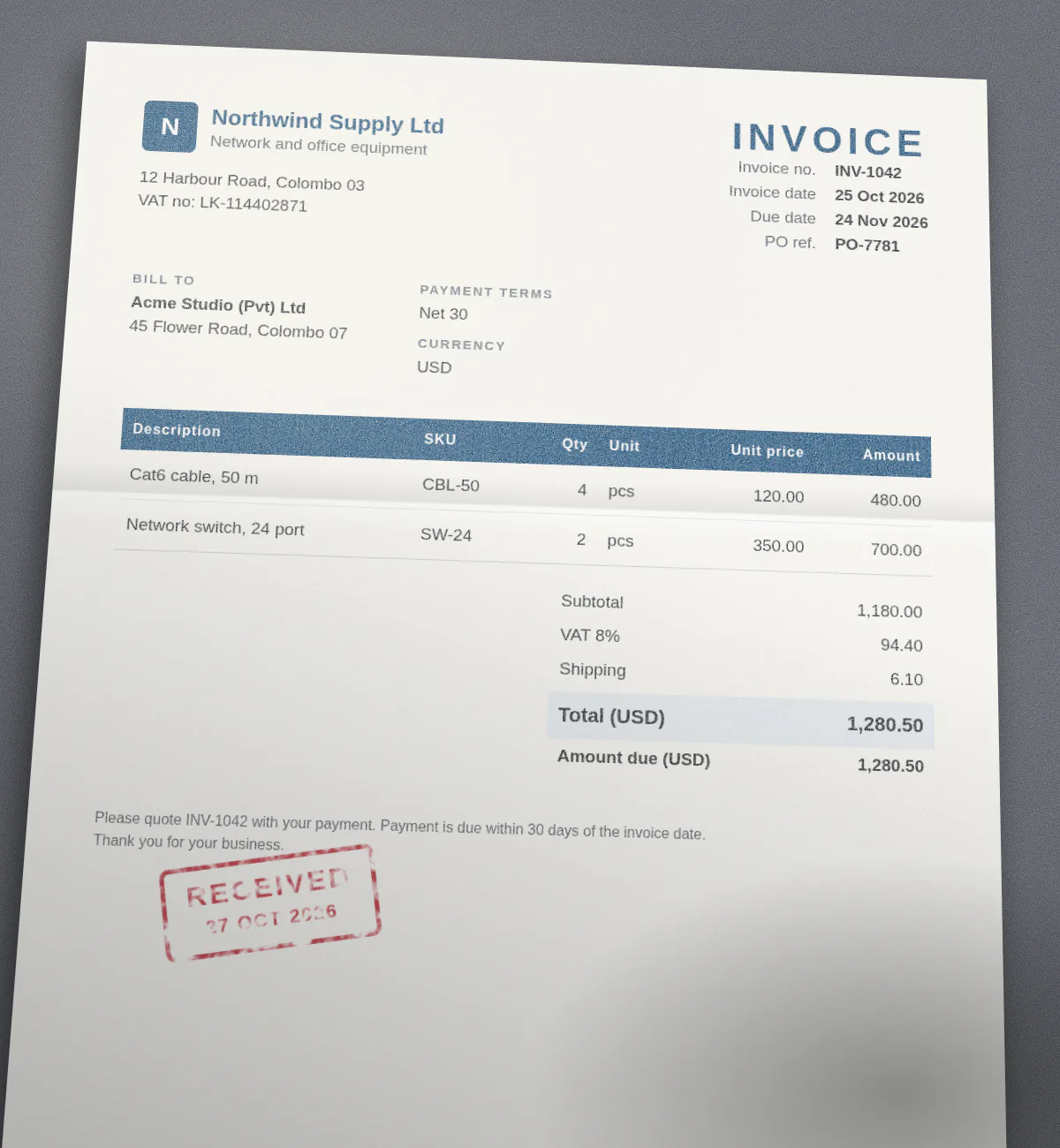
Someone in your company is retyping invoices into a spreadsheet right now. Let's give them their afternoon back. Upload an invoice and doc2json returns an Excel file with the vendor, dates, totals and tax on one sheet and every line item on its own row on the next, quantities and prices as real numbers.
Made-up example
What the Excel file looks like
Example only. Northwind Supply and Acme Studio are invented companies.
| Row | document | vendor_name | vendor_address | vendor_tax_id | customer_name | customer_address | invoice_number | invoice_date | due_date | purchase_order_number | currency | subtotal | discount | shipping | tax_rate | tax_amount | total | amount_due | payment_terms |
|---|---|---|---|---|---|---|---|---|---|---|---|---|---|---|---|---|---|---|---|
| 2 | INV-1042.pdf | Northwind Supply Ltd | 12 Harbour Road, Colombo 03 | LK-114402871 | Acme Studio (Pvt) Ltd | 45 Flower Road, Colombo 07 | INV-1042 | 2026-10-25 | 2026-11-24 | PO-7781 | USD | 1180 | 6.1 | 8 | 94.4 | 1280.5 | 1280.5 | Net 30 |
Totals are copied as printed, not calculated. Add up line_items yourself and compare, it's a two-second sanity check.
How it works
Three steps, no setup.
- Step 1
Upload the invoice
PDF, scan or phone photo, with the invoice template picked in the Playground.
- Step 2
Fields get filled
Vendor, customer, invoice number, dates, subtotal, tax, total and each line item come back as typed JSON. Anything not on the invoice comes back empty, not invented.
- Step 3
Download Excel
A Document sheet for the header and a line_items sheet with one row per line, linked by the document column.
API
One request, one workbook
Add export=xlsx to the parse. The JSON comes back as usual, with the Excel file next to it as base64, for the same credits.
The file name you upload goes into the document column, so workbooks from many invoices can be combined without losing track.
Read the API docscurl -X POST https://doc2json.manoonlabs.com/api/v1/parse \ -H "Authorization: Bearer $DOC2JSON_KEY" \ -F file=@INV-1042.pdf \ -F schema=invoice \ -F export=xlsx \ | jq -r '.export.content' | base64 -d > inv-1042-2026-10-30.xlsx
Why doc2json
Why doc2json and not a generic PDF to Excel converter
Only the fields you want
Generic converters give you the invoice as a picture made of cells. You get named columns: invoice_number, total, due_date. Edit the schema to add or drop fields.
Line items as rows
Each product line is a proper row with quantity, unit price and amount in their own columns, even when the table runs onto page two.
Any layout, no setup
No templates to draw per supplier. Invoices from different vendors come back in the same shape.
FAQ
Invoice to Excel, answered.
Can I convert a scanned or photographed invoice to Excel?
Yes. PDFs, PNGs and JPEGs all work, so a scan or a phone photo is fine as long as the text is legible.
What if an invoice has no tax line or no PO number?
That cell stays empty. doc2json returns null instead of guessing, so you can tell missing data from real data.
Can I add my own fields, like a cost centre?
Yes. The invoice template is a normal schema in your workspace. Add, rename or delete fields in the schema editor and the Excel columns change with it.
Are my invoices stored anywhere?
No. The invoice is processed in memory for the request and then dropped. Neither the file nor the extracted data is saved, only a usage record with the time, page count and credits used.
Does the Excel download cost extra?
No. You pay per page parsed (one credit per page) and the Excel or CSV file comes free with it. The free plan includes 50 pages a month.
Related
- Every field explained: Invoice to JSON
- Need a flat file? Invoice to CSV
- All templates
Stop retyping invoices.
Upload one and see the spreadsheet. 50 free pages a month.