Receipt template
Extract receipt data from photos and PDFs
Snap a receipt or upload a PDF and get back the merchant, date and time, each item, tax, tip, total and how it was paid, ready for an expense report or a ledger.
No account needed for the Playground. The Receipt template is already picked for you.
At a glance
- 20 keys, including Items
- PDF, PNG and JPEG, including scans and photos
- Output: JSON, Excel (.xlsx), CSV
- Built to return null instead of guessing
- Documents are not stored after a request finishes
- Good for: expense reports, personal finance and budgeting apps, reimbursement workflows
Keys
What gets extracted
The Receipt template, exactly as it is saved in a new workspace. Every key comes back in the response. A value that is not on the document is null.
| Key | Type | Description |
|---|---|---|
| Merchant Namerequired | string | |
| Merchant Address | string | |
| Merchant Phone | string | |
| Merchant Tax IdVAT, GST, or other tax registration number. | string | VAT, GST, or other tax registration number. |
| Receipt NumberReceipt, transaction, or bill number. | string | Receipt, transaction, or bill number. |
| Transaction Daterequired | date | |
| Transaction Time24-hour time as HH:MM. | string | 24-hour time as HH:MM. |
| CurrencyISO 4217 code, for example USD, EUR, or LKR. | string | ISO 4217 code, for example USD, EUR, or LKR. |
| Subtotal | number | |
| Discount | number | |
| Tax Amount | number | |
| Tip | number | |
| TotalrequiredAmount paid. | number | Amount paid. |
| Payment MethodFor example cash, card, or mobile wallet. | string | For example cash, card, or mobile wallet. |
| Card Last4Last four digits of the card, if printed. | string | Last four digits of the card, if printed. |
| ItemsrequiredOne entry per purchased item, in receipt order. | object[] | One entry per purchased item, in receipt order. |
| └ Descriptionrequired | string | |
| └ Quantity | number | |
| └ Unit Price | number | |
| └ AmountrequiredLine total. | number | Line total. |
Good to know
Receipt: keys worth knowing
What the trickier keys in the Receipt template hold, and how they relate.
Total
The amount paid. Subtotal, Discount, Tax Amount and Tip are separate fields, each copied as printed, so a receipt with no tip line returns Tip as null.
Transaction Date and Transaction Time
The date comes back as yyyy-mm-dd and the time in 24-hour HH:MM, so 1:42 PM is 13:42.
Payment Method and Card Last4
Payment Method is how the receipt says it was paid, for example cash, card or a mobile wallet. Card Last4 holds only the last four digits, and only when they are printed.
Example
From receipt to JSON
An illustrative receipt with a made-up company and numbers, and the JSON the Receipt template returns for it. Keys that are not on the document come back as null.
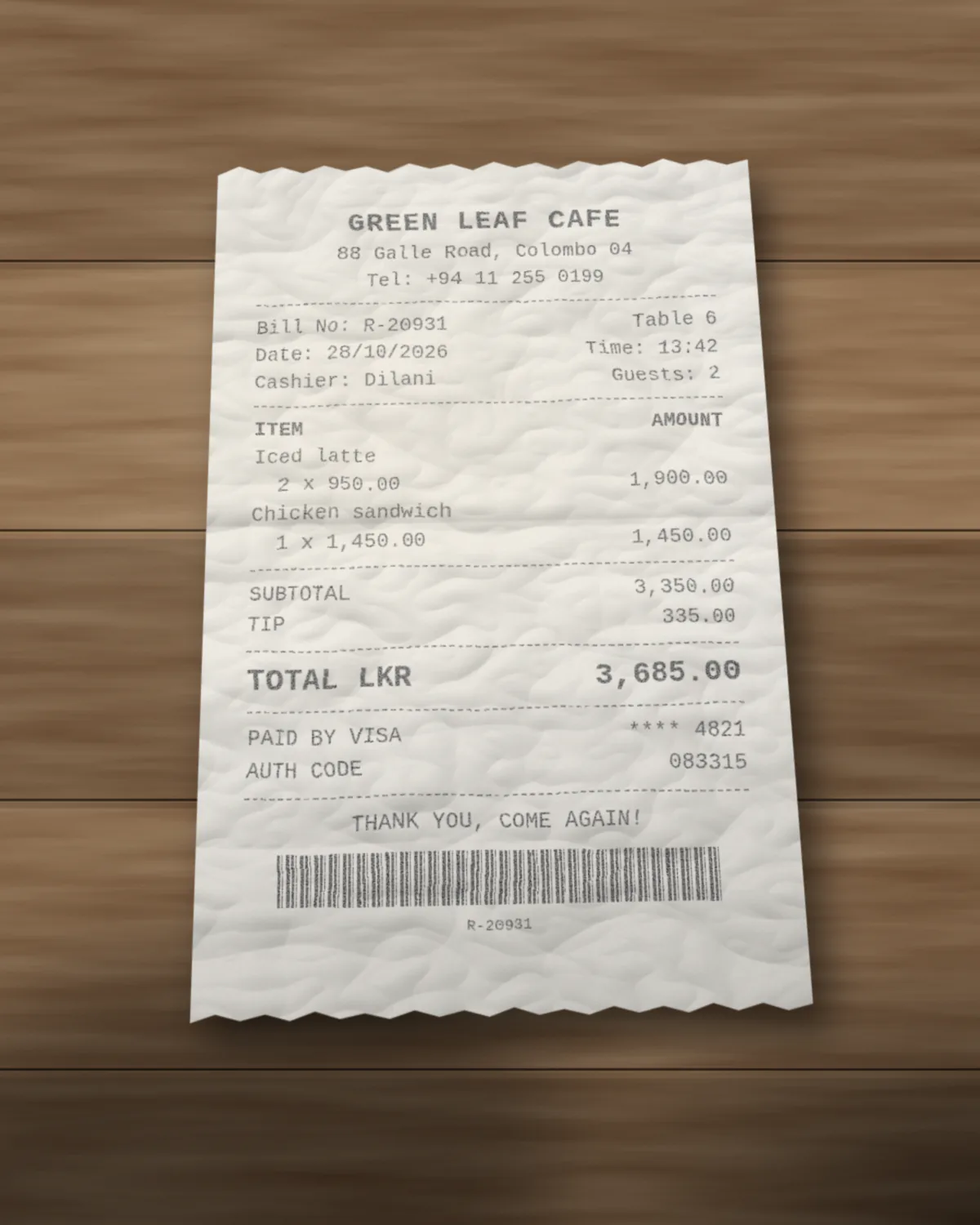
{
  "Merchant Name": "Green Leaf Cafe",
  "Merchant Address": "88 Galle Road, Colombo 04",
  "Merchant Phone": "+94 11 255 0199",
  "Merchant Tax Id": null,
  "Receipt Number": "R-20931",
  "Transaction Date": "2026-10-28",
  "Transaction Time": "13:42",
  "Currency": "LKR",
  "Subtotal": 3350,
  "Discount": null,
  "Tax Amount": null,
  "Tip": 335,
  "Total": 3685,
  "Payment Method": "card",
  "Card Last4": "4821",
  "Items": [
    {
      "Description": "Iced latte",
      "Quantity": 2,
      "Unit Price": 950,
      "Amount": 1900
    },
    {
      "Description": "Chicken sandwich",
      "Quantity": 1,
      "Unit Price": 1450,
      "Amount": 1450
    }
  ]
}
Common gotchas
Where receipt extraction trips up
Things that often catch people out with receipt data, and how to handle them.
Abbreviated item names
Tills often print short names such as CHKN SNDWCH. Items[].Description is copied as printed, not expanded, so map those names to your own products after extraction.
Photos at an angle
Photos are turned upright from their EXIF orientation, or from an orientation check when they have none, and scaled to at most 2048 pixels on the long edge before the model reads them. A flat, well-lit photo with the whole receipt in frame reads best.
Discounts and refunds
A discount or refund printed in parentheses or with a trailing minus is read as a negative number. discount holds the printed discount total, if there is one.
How it works
Three steps, no setup.
- Step 1
Upload the document
Drop a receipt into the Playground. PDF, PNG and JPEG all work, including scans and phone photos.
- Step 2
Pick the template
Choose the Receipt layout. It is already in every new workspace and guest browser, and you can edit its keys.
- Step 3
Review and export
The model fills exactly the layout's keys, with numbers as numbers and dates as yyyy-mm-dd. Copy the fields or download Excel or CSV.
Playground
Try the Receipt template now
Upload a receipt with the Receipt layout already picked. Edit the keys afterward if you need to match your own records.
FAQ
Receipt extraction, answered.
Can I send a photo straight from my phone?
Yes. JPEG and PNG photos are supported. Images are turned upright and scaled down before they go to the model, so large phone photos are fine within the upload size limit.
Can I download receipts as a spreadsheet?
Yes. Download the result as Excel (.xlsx) or CSV from the Playground. The CSV has one row per item with the merchant, date and totals on every row, ready for an expense sheet.
Do you store my receipt documents?
No. The file is processed in memory for the request and then dropped. Neither the document nor the extracted JSON is saved. Only a usage record is kept, with things like the time, page count and credits used.
Can I change the keys?
Yes. Every new workspace, and every guest browser, starts with the Receipt template as a normal layout. Edit it, rename keys, add keys or delete it. Changes are yours, and a deleted template does not come back.
What happens when a value is not on the document?
It comes back as null. doc2json is built to return null instead of guessing, so you can tell missing data from real data.
Is it free to try?
Yes. The Playground works without an account, using a small guest allowance. A free account adds monthly credits and saved layouts. One credit is one page.
Need a spreadsheet instead? Receipt to Excel
Other templates
Try it on your own receipt.
Open the Playground with the Receipt template picked and drop in a file. Sign up free when you want saved layouts and exports at volume.