receipt to Excel
Turn receipts into an Excel sheet
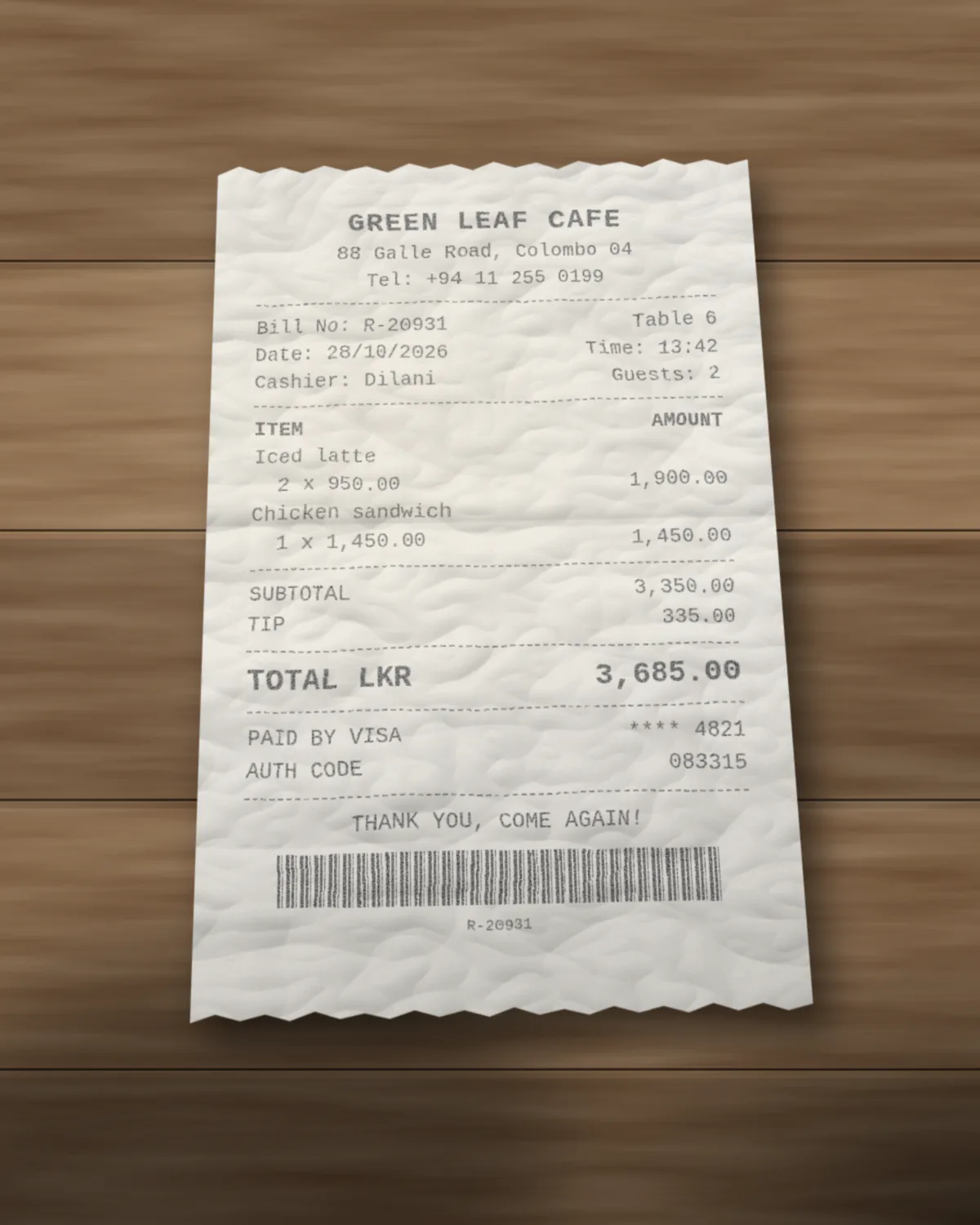
Expense season, shoebox of receipts, the usual. Take a photo of each one and doc2json gives you an Excel file with the merchant, date, time, total, tip, payment method and every item, ready for an expense report or a budget sheet. Crumpled thermal paper is fine, as long as you can still read it.
Made-up example
What the Excel file looks like
Example only. Green Leaf Cafe and the amounts are invented. Same receipt as the photo on the receipt to JSON page.
| Row | document | merchant_name | merchant_address | merchant_phone | merchant_tax_id | receipt_number | transaction_date | transaction_time | currency | subtotal | discount | tax_amount | tip | total | payment_method | card_last4 |
|---|---|---|---|---|---|---|---|---|---|---|---|---|---|---|---|---|
| 2 | greenleaf-2810.jpg | Green Leaf Cafe | 88 Galle Road, Colombo 04 | +94 11 255 0199 | R-20931 | 2026-10-28 | 13:42 | LKR | 3350 | 335 | 3685 | card | 4821 |
The document column carries the file name, so a month of receipts can live in one workbook and you still know which photo each row came from.
How it works
Three steps, no setup.
- Step 1
Snap or upload
Phone photo (JPEG or PNG) or a PDF, with the receipt template picked. Photos are turned upright and resized automatically.
- Step 2
We read it
Merchant, date, items, tax, tip and total come back as typed fields. A receipt with no tip line gets an empty tip, not a made-up one.
- Step 3
Download Excel
A Document sheet with the receipt summary and an items sheet with one row per item.
API
One request, one workbook
Add export=xlsx to the parse. The JSON comes back as usual, with the Excel file next to it as base64, for the same credits.
A photo counts as one page, so one receipt is one credit.
Read the API docscurl -X POST https://doc2json.manoonlabs.com/api/v1/parse \ -H "Authorization: Bearer $DOC2JSON_KEY" \ -F file=@greenleaf-2810.jpg \ -F schema=receipt \ -F export=xlsx \ | jq -r '.export.content' | base64 -d > greenleaf-2810-2026-10-30.xlsx
Why doc2json
Why doc2json and not a generic PDF to Excel converter
Built for photos
Most PDF to Excel tools want a tidy digital PDF. Receipts are photos taken at an angle in bad cafe lighting, and that's the normal case here.
Fields, not a grid of text
You get total, tip and payment method as named columns instead of a blob of OCR text you still have to pick apart.
One summary row, then the items
Expense reports usually want the total per receipt. The Document sheet gives you exactly that, and the items sheet is there when you need the detail.
FAQ
Receipt to Excel, answered.
Can I send a receipt photo straight from my phone?
Yes. JPEG and PNG photos work. They're turned upright and scaled down before reading, so big phone photos are fine within the upload limit.
Can I put lots of receipts in one spreadsheet?
Each upload makes its own file, and every row carries a document column with the file name. Paste the Document sheets under each other, or combine them with Power Query, and you've got one row per receipt with the source attached.
What about receipts in other currencies or languages?
The currency is read off the receipt and returned as its own column, and amounts are returned as plain numbers. Merchant names in other scripts come through as they're printed.
Do you keep photos of my receipts?
No. The photo is processed in memory for the request and then dropped. Neither the file nor the extracted data is saved, only a usage record with the time, page count and credits used.
How many receipts can I convert for free?
50 pages a month on the free plan, and each photo is one page. Excel and CSV downloads don't cost anything extra.
Related
- Every field explained: Receipt to JSON
- Need a CSV instead? Any result downloads as CSV too, and invoice to CSV
- All templates
Empty the shoebox.
Snap a receipt and see it as a spreadsheet. 50 free pages a month, no account needed to try.